
Plague Inc: Scenario Creator
Ndemic CreationsProductivity
4.3648.00 Reviews
- Version
- 1.2.8
- Installs
- 100.00K
- Age Rating
- Everyone
Screenshots
Our Review of Plague Inc: Scenario Creator
 Analysis by Appyee
I find the most useful way to judge Plague Inc: Scenario Creator is as a focused creative tool for people who already enjoy thinking about how a Plague Inc scenario works. It is a productivity app from Ndemic Creations, but its purpose is specific: shaping custom scenarios for the game rather than helping with everyday tasks. That makes it appealing if you like building rules and testing ideas, and a poor fit if you simply want a new standalone game to play.
Getting Started with Your Scenario
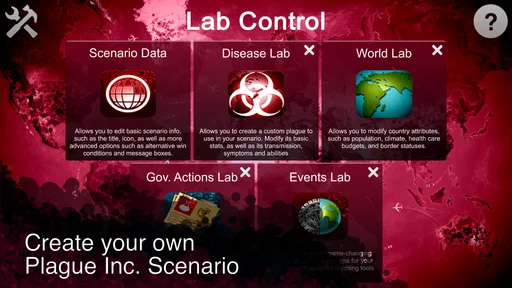
Right off the bat, downloading and setting up the Plague Inc: Scenario Creator is a breeze. Once you’ve got it installed, the app welcomes you with a user-friendly interface that’s as straightforward as it is powerful. You can start creating scenarios from scratch or modify existing ones to fit your diabolical vision.
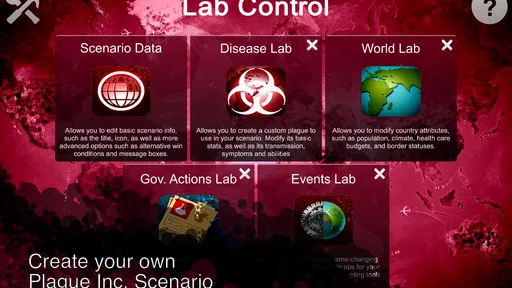
The app allows you to tweak every aspect of a pandemic: the pathogen type, transmission methods, symptoms, and even how governments respond. It feels like a sandbox where you’re the mastermind behind the next big outbreak. Trust me, it’s as exciting as it sounds!
Designing Your Pathogen
This is where the fun really begins. You can choose from different pathogen types, each with unique traits and challenges. Want a virus that spreads like wildfire or a bacteria that lurks in the shadows? The choice is yours. The app offers a plethora of options, allowing you to customize how your creation evolves over time.
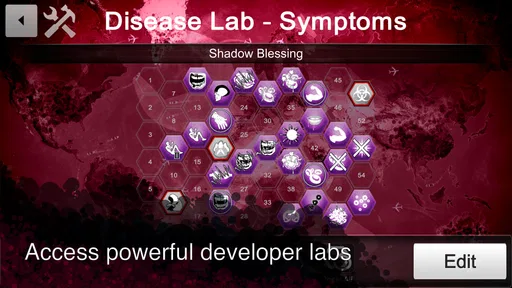
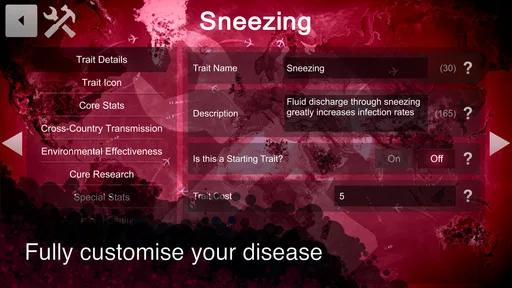
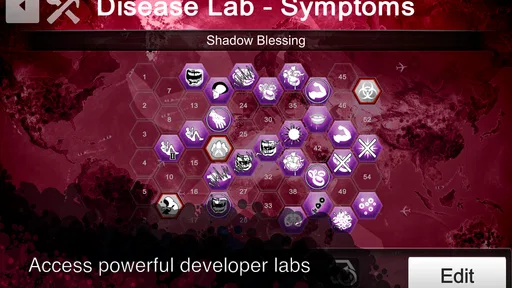
One of the coolest features is the ability to add custom symptoms and transmission methods. Imagine a virus that spreads through laughter or a bacteria that becomes airborne every time someone sneezes. The possibilities are endless, and the app’s intuitive design makes it easy to bring your ideas to life.
Scenario Settings and World Events
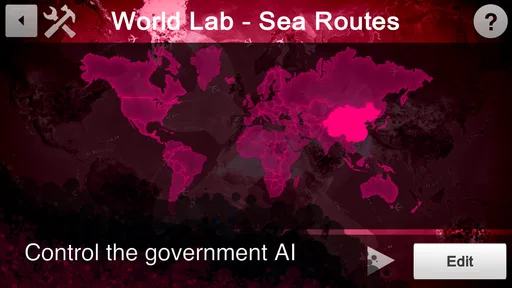
The app doesn’t just stop at pathogens. You can also modify world events and government responses to your outbreak. Will countries close their borders or focus on developing a cure? How will the public react to the growing threat? You’re in control of every aspect, and this level of detail adds a layer of strategy to your scenario.
One feature I particularly enjoyed is the ability to set custom victory conditions. Whether it’s achieving global infection or bringing humanity to its knees, you can tailor the endgame to suit your narrative. It’s like writing your own apocalypse story, and it’s thrilling to see how it all unfolds.
From a Rough Idea to a Playable Scenario
For me, the best use is to begin with one clear design question rather than trying to make a huge, complicated scenario immediately. Maybe I want to see whether a slow-spreading pathogen can still create pressure, or whether an early public response changes the feel of a run. I would change a small set of related rules, then play the result and note what feels too easy, too punishing, or simply confusing. That makes the editor useful as a cycle of drafting and testing, not just a screen full of settings to fill in.
A practical example: if I have a spare stretch of time in the evening, I can sketch a scenario around one unusual transmission idea, give it a clear win condition, and test whether the rules tell a coherent story. If the playthrough ends before the central twist matters, I know the setup needs adjustment. If the goal is unclear while playing, I can simplify the conditions. This small-test approach is more effective than adding every imaginative idea at once, because each change remains easier to evaluate.
I would also keep a brief note outside the editor while experimenting: the premise, the rule I changed, and what happened during a test. That is not a special app feature, just a useful habit when several settings interact. It helps me avoid confusing a genuinely interesting outcome with one caused by an accidental imbalance. For anyone who enjoys tuning systems, that process can be as satisfying as the final scenario; for someone who only wants quick, ready-made play, it may feel like extra work.
Sharing Your Creations
After crafting your masterpiece, what’s next? Share it with the world, of course! The app allows you to upload your scenarios to the Plague Inc community, where players can download and play your creations. It’s a fantastic way to see how others react to your scenarios and perhaps even get inspired by their feedback and ideas.
The community aspect is a huge bonus, as it fosters creativity and collaboration among players. You’ll find a wealth of user-generated content to explore, ensuring that the game never feels stale. Plus, seeing your scenario downloaded and enjoyed by others is immensely satisfying.
What to Expect from the Community
Sharing works best when a scenario can explain itself through play. I would give the central idea a simple, recognizable shape and avoid piling on twists that only make sense to me as the creator. A useful test is to let someone else try it without coaching them: if they can tell what the challenge is and why the outcome feels earned, the design is communicating well. Community play can expose confusing rules more quickly than repeated solo testing.
There is a trade-off, though. A community library is valuable when I want fresh scenarios without designing one myself, but user-created content can vary in clarity and balance. I would treat each download as an experiment rather than assuming every scenario will be polished. If I am short on time, choosing something that sounds straightforward is a safer way to get a satisfying session than picking the most elaborate premise.
How It Differs from Other Creative Tools
Compared with a general note-taking app or a document editor, this is much narrower and more interactive: the ideas are intended to become scenarios that can be played within Plague Inc, not merely written down. A general writing tool is better if I want flexible world-building, a plot outline, or material that is not tied to this game. A strategy game with fixed campaigns is better when I want to start playing immediately. This creator sits between those choices: it gives me room to shape a challenge, but that freedom asks me to do some design work before the payoff.
That distinction also answers a practical question: do I need to be an experienced designer to enjoy it? I don’t think so, but I do think it helps to know the basic rhythm of Plague Inc. Familiarity makes it easier to judge whether a setting is creating a meaningful decision or merely making a run harder. Newcomers can still experiment, but should expect some trial and error and may get more from learning the main game first.
Trust, Choices, and a Sensible Check
Because the editor is about creating and sharing, I would pay attention to the choices I make when moving a scenario beyond my device. The meaningful distinction is between keeping an idea as a personal experiment and choosing to publish it for other players. I would review a scenario for accidental personal details in its title or description before sharing, and keep the premise focused on the fictional challenge. That is a sensible habit for any user-generated content, not a claim about what this app collects or what permissions it requests.
I also prefer to make one deliberate change at a time when testing, rather than publishing a first draft immediately. It gives me a clearer sense of which part of the design works and makes any later edit more purposeful. The app is most rewarding when I treat it as a creative workspace, but I would not mistake that for a general-purpose writing or privacy-management tool. If account settings or device permissions matter to your decision, check the options shown on your own device and in the app before sharing; I would not assume controls that I cannot see.
Who I’d Recommend It To
I’d recommend it to Plague Inc players who enjoy tinkering, testing variations, and turning a small premise into a playable challenge. It can also suit someone who likes systems design but does not need a broad editor: the subject and destination are already defined by the game. The strongest payoff comes when I’m curious about how a rule changes a run, or when I want to build something for friends or the player community to try.
I would skip it if I’m looking for a conventional productivity suite, a self-contained strategy game, or effortless entertainment with no setup. It is also not the right choice if I dislike iteration; a custom scenario may need several passes before its rules feel fair and its goal is easy to understand. The listed price is $3.99, so I’d first ask myself whether I will genuinely use the creation tools rather than buying it only because I like the main game.
Final Thoughts
Overall, the Plague Inc: Scenario Creator is a must-have for anyone who enjoys the original game. It takes the concept to a whole new level by putting you in the driver’s seat of your own pandemic. The app’s intuitive design, coupled with its vast array of customization options, makes it a powerful tool for storytelling and strategy.
If you’re looking to challenge your creativity and strategic thinking, give this app a try. Whether you’re a seasoned Plague Inc player or a newcomer, the Scenario Creator offers endless hours of entertainment and a unique way to engage with the game’s world. So, what are you waiting for? Get out there and start crafting your ultimate pandemic!
Practical Details Before Deciding
The app is rated for Everyone, and its current version is 1.2.8, with Android 6.0 as the minimum operating-system requirement. It was released on April 25, 2017. I’d use those details to check basic compatibility and suitability, while remembering that the real question is whether the scenario editor fits the way I like to play. Its average rating is 4.3 from around 2.8 thousand ratings, with over 100 thousand installs; those figures suggest an established audience, but they cannot tell me whether I’ll enjoy designing rather than simply playing.
My cautious verdict is that this is a worthwhile purchase for a particular kind of Plague Inc fan, not an automatic recommendation for everyone who likes strategy games. Ndemic Creations has made a tool centered on player-authored scenarios, and that focus is its strength as well as its limit. I’d go in expecting to experiment, revise, and decide for myself what to share. If that sounds like part of the fun, it has a clear reason to earn a place on your device; if you mainly want ready-made play, the main game or its existing scenarios are a better starting point.
Verdict
Strengths of Plague Inc: Scenario Creator
- User-friendly interface for easy scenario creation.
- Extensive customization options for creativity.
- Regular updates with new features.
- Supports sharing and community collaboration.
- Detailed tutorials for beginners.
Limitations of Plague Inc: Scenario Creator
- Requires Plague Inc to play created scenarios.
- Might be overwhelming for new users.
- Some features locked behind in-app purchases.
- Occasional bugs in complex scenarios.
- Limited offline functionality.
Other Releases by Ndemic Creations
View All
Plague Inc.
Simulation4.7

Rebel Inc: Scenario Creator
Entertainment4.2
Similar Picks in This Category
View All
Google Calendar
Google LLC4.6

Google Drive
Google LLC4.3

Google Assistant
Google LLC3.9

Microsoft OneDrive
Microsoft Corporation4.6

Samsung Calendar
Samsung Electronics Co., Ltd.4.1

Microsoft OneNote: Save Notes
Microsoft Corporation4.6
Frequently Asked Questions
What is Plague Inc: Scenario Creator and how does it work?
Plague Inc: Scenario Creator is an expansion tool for the popular strategy game Plague Inc. It allows users to design their own custom scenarios, modifying gameplay elements such as pathogens, events, and world parameters. The tool provides a creative platform for both casual players and dedicated fans to experiment with new gameplay mechanics and share their scenarios with the community.
Do I need to own Plague Inc to use the Scenario Creator?
Yes, you must own Plague Inc to utilize the Scenario Creator, as it is an extension of the main game. The Scenario Creator is designed to enhance the experience by allowing players to create and modify game scenarios. It integrates seamlessly with the base game to provide a richer and more personalized gameplay experience.
Is the Scenario Creator user-friendly for beginners?
The Scenario Creator is designed to be accessible to both beginners and experienced players. It features an intuitive interface with various tools and options to guide users through the creation process. While it offers advanced features for in-depth customization, beginners can start with simpler modifications and gradually explore more complex elements as they become familiar with the tool.
Can I share my custom scenarios with other players?
Yes, the Scenario Creator allows you to share your custom scenarios with the Plague Inc community. Once you've created a scenario, you can upload it for others to download and play. This feature fosters a collaborative environment where players can explore diverse and unique scenarios crafted by the community, enhancing the game's replayability.
What platforms is the Scenario Creator available on?
Plague Inc: Scenario Creator is available on both Android and iOS platforms. This ensures that players on mobile devices can access and enjoy the creative tools it offers. The app is optimized for touch interfaces, providing a smooth experience whether you're using a smartphone or tablet.
